8 Best Bilingual Dictation Apps: 5 Tested + 3 Baselines
Most dictation apps look bilingual until you change languages halfway through a sentence. The useful test is not how many languages appear in Settings; it is whether the final text preserves each switch without translation or script changes.
In our 70-second Russian-English test, AI Dictation ranked first among the five measured apps. Its final product output scored 11.6% word error rate, preserved 26 of 27 English tokens, and completed the full recording.
That result matters because a polished transcript can still be wrong. A weak bilingual speech-to-text app may translate the smaller language, spell English words in Cyrillic, damage names, or quietly drop a phrase during a switch.
We compared five apps on the same recording and added three common tools worth using as baselines. AI Dictation is our product. The fixed human reference appears below, and the linked comparisons show detailed competitor outputs.
Which bilingual dictation app is best?
AI Dictation is the best bilingual dictation app from our measured Russian-English test. It preserved 26 of 27 embedded English tokens and finished the full 146-word recording without translating the Russian speech.
The other picks fit different jobs. Soniox App is a useful standalone alternative. Wispr Flow offers a polished cross-device experience. Superwhisper gives Mac users more model control. Apple Dictation, Google Docs Voice Typing, and Microsoft Dictate are sensible free baselines.
| Bilingual dictation app | Role in this guide | Best for | Evidence |
|---|---|---|---|
| AI Dictation | Measured app | Dense code-switching across major platforms | 11.6% WER, 96.3% English recall |
| Soniox App | Measured app | Standalone multilingual transcription | 17.1% WER, 74.1% recall |
| Diktuy | Measured app | Complete Russian-English transcription | 20.5% WER, 59.3% recall |
| Wispr Flow | Measured app | Polished app-wide dictation | 27.4% WER, 63.0% recall |
| Superwhisper | Measured app | Mac users who want model controls | Raw output was incomplete |
| Apple Dictation | Free baseline | Built-in dictation on Apple devices | Official feature review; not benchmarked here |
| Google Docs Voice Typing | Free baseline | Browser dictation in Google Docs | Official feature review; not benchmarked here |
| Microsoft Dictate | Included baseline | Word and Microsoft 365 users | Official feature review; not benchmarked here |
How did we test bilingual dictation apps?
We tested each app against one human-annotated, 146-word transcript with 27 English tokens embedded inside Russian speech. Every app had to preserve the language switches, keep the correct script, avoid translation, and reach the final sentence.
The source was a public 70-second clip titled “Смотря какой fabric смотря сколько details”. Russian carries the grammar, but the speaker repeatedly switches into English for phrases including “Mango colors,” “capri pants,” “look couture,” “fabric,” “price,” and “spring and summer.”
We scored five things:
- Word error rate (WER): substitutions, deletions, and insertions against the full reference. Lower is better.
- English-token recall: how many of the 27 English words survived in Latin script. Higher is better.
- Script preservation: whether English stayed Latin and Russian stayed Cyrillic.
- Completeness: whether the app reached the recording’s final sentence.
- Unwanted translation: whether the app changed transcription into translation.
Here is the human reference used for every score:
Что модно в этом сезоне, на ваш взгляд и на взгляд Simon Чена? Mango colors, шелк очень модный. Очень модные пиджаки с какими-то details, брюки модно, capri pants модно. И это всё on design. Джинсы он очень красивые делает. Можно одеть capri джинсы, красивую блузку под низ, накинуть jacket. Можно так на работу выйти, можно так пойти и погулять потом. Так что он universal. И модно всё. Всё красивое и fit его amazing, amazing на всех. У него look couture без этих couture prices. Его костюмы, смотря какой fabric, смотря откуда приходит fabric, смотря сколько details в этом пиджаке, может price от 225, самый дорогой 380. Он very очень-очень affordable. Ну что ж, замечательно. Ну и заключение, чисто традиционный вопрос: ваше пожелание нашим милым и обаятельным телезрительницам? Я вам желаю хорошей spring and summer, чтобы вы приходили красиво одевались, и мы вам можем помочь.
The proper name “Simon Chang” created another useful trap. It appears inside a Russian sentence and changes grammatical form, which exposes whether a system understands the switch or simply guesses at the sound.
What did the bilingual dictation benchmark show?
The benchmark showed a 51.9-point gap in English-token recall between the strongest and weakest scored app outputs. AI Dictation preserved 96.3% of the English tokens; Superwhisper’s raw output preserved 44.4% and omitted a large part of the recording.
| App or pipeline | WER | English-token recall | Complete? | Main failure |
|---|---|---|---|---|
| AI Dictation, final product output | 11.6% | 96.3% | Yes | Minor Russian wording errors |
| Soniox stt-rt-v5, raw recognition | 12.3% | 96.3% | Yes | Wrote Simon as Саймон |
| GPT Transcribe, earlier raw recognition | 13.7% | 96.3% | Yes | Damaged Simon Chang |
| Soniox App 1.6.0 | 17.1% | 74.1% | Yes | Lost or transliterated 7 English tokens |
| Diktuy | 20.5% | 59.3% | Yes | Lost or transliterated 11 English tokens |
| Wispr Flow | 27.4% | 63.0% | Yes | Damaged language-boundary words |
| Superwhisper S1 Voice, raw | 46.6% | 44.4% | No | Omitted a large middle section |
| Superwhisper S1 Voice + S1 Language | Not scored | Not retained | Yes | Normalized the output toward Russian |
One recording cannot settle every language pair. It can expose the failure modes that generic “supports 100 languages” claims miss. Russian-English is especially useful because the scripts make transliteration and unwanted translation easy to spot.
Why did AI Dictation rank first for bilingual speech?
AI Dictation ranked first because its final product output combined the lowest WER with the highest English-token recall and a complete transcript. The latest captured final output made 17 edits against the 146-word reference for 11.6% WER and preserved 26 of 27 English tokens.
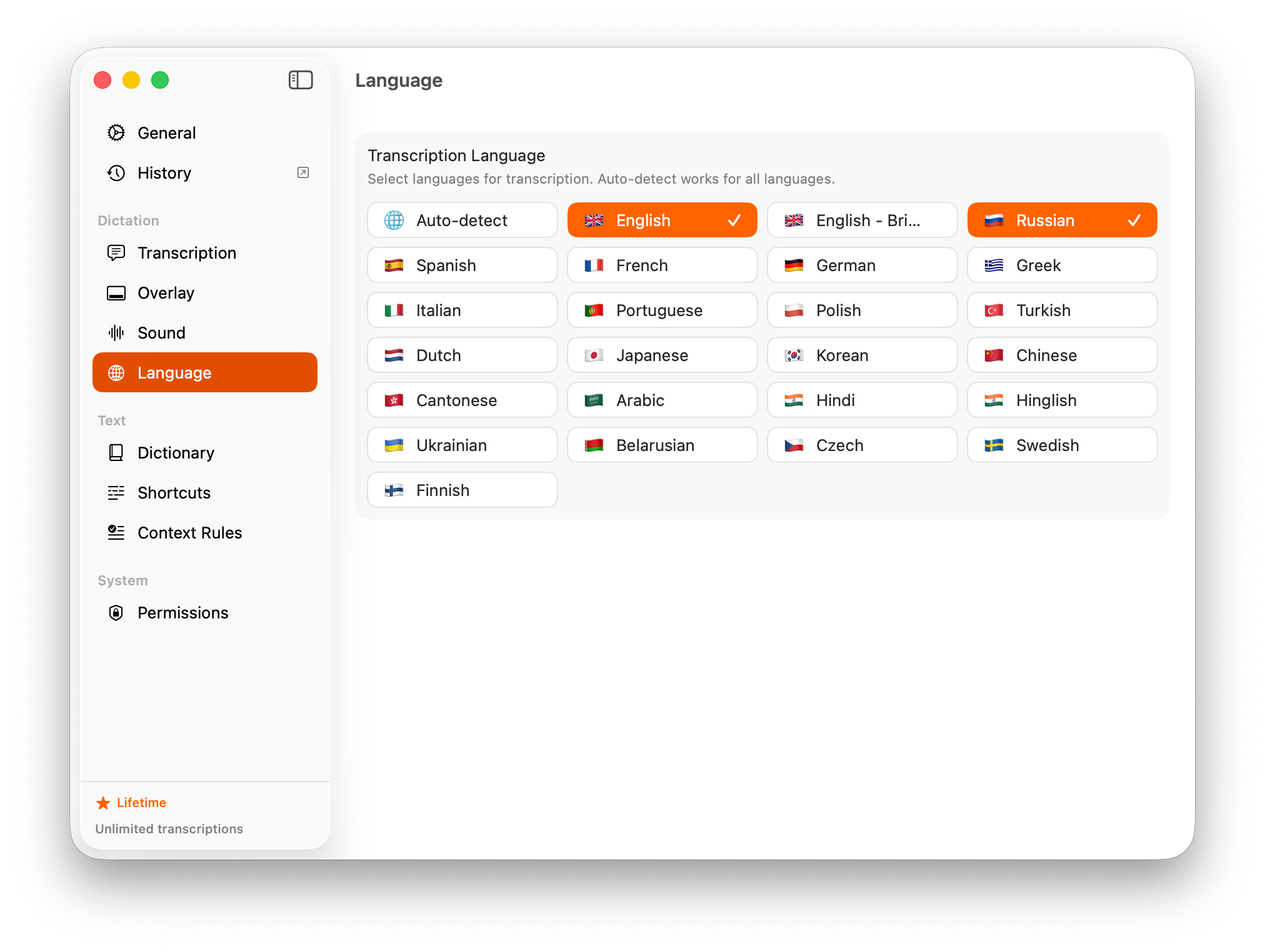
The transcript kept “Mango colors,” “details,” “capri pants,” “on design,” “jacket,” “universal,” “fit,” “amazing,” “look couture,” both instances of “fabric,” “price,” “affordable,” and “spring and summer.” It retained 26 of the 27 English tokens in Latin script.
AI Dictation lets users select more than one language, and the recognition pipeline receives those language hints together. The cleanup stage also receives the full raw transcript and the user’s vocabulary, replacements, expansions, and formatting rules. That context helps correct names and terms without treating a mixed-language sentence as a translation request.
Raw Soniox recognition scored 12.3% WER with the same 96.3% English recall; the final product text improved that to 11.6%. Our earlier GPT Transcribe recognition scored 13.7%. Soniox reduced errors in the Russian sections while preserving the switches, which is why it now powers cloud transcription. Release v0.0.113 documents the earlier cross-platform transcription rollout.
How did the other tested bilingual dictation apps perform?
Every tested alternative exposed a different code-switching failure. Soniox App and Diktuy completed the clip but lost more English words; Wispr Flow damaged several boundary words; Superwhisper’s standard two-stage result normalized away too much of the mix.
Soniox App: the strongest tested alternative
Soniox App scored 17.1% WER, preserved 20 of 27 English tokens, and completed the recording. The captured app state had no languages selected, while AI Dictation had English and Russian enabled, so this is a tested product result rather than a perfectly matched configuration. Our AI Dictation vs Soniox App comparison includes the full transcript and scorecard.
Diktuy: complete, but weaker at language boundaries
Diktuy scored 20.5% WER and preserved 16 of 27 English tokens. Words including “fabric,” “jacket,” “fit,” and “price” were converted to Cyrillic. It heard the sounds, but the output lost part of the speaker’s language choice. See the full AI Dictation vs Diktuy test.
Wispr Flow: polished output with costly repairs
Wispr Flow finished the clip and preserved phrases such as “Mango colors,” “look couture,” and “spring and summer.” It also changed “capri pants” to “Капри-пенс,” “fit” to “фет,” and “fabric” to “фабрик.”
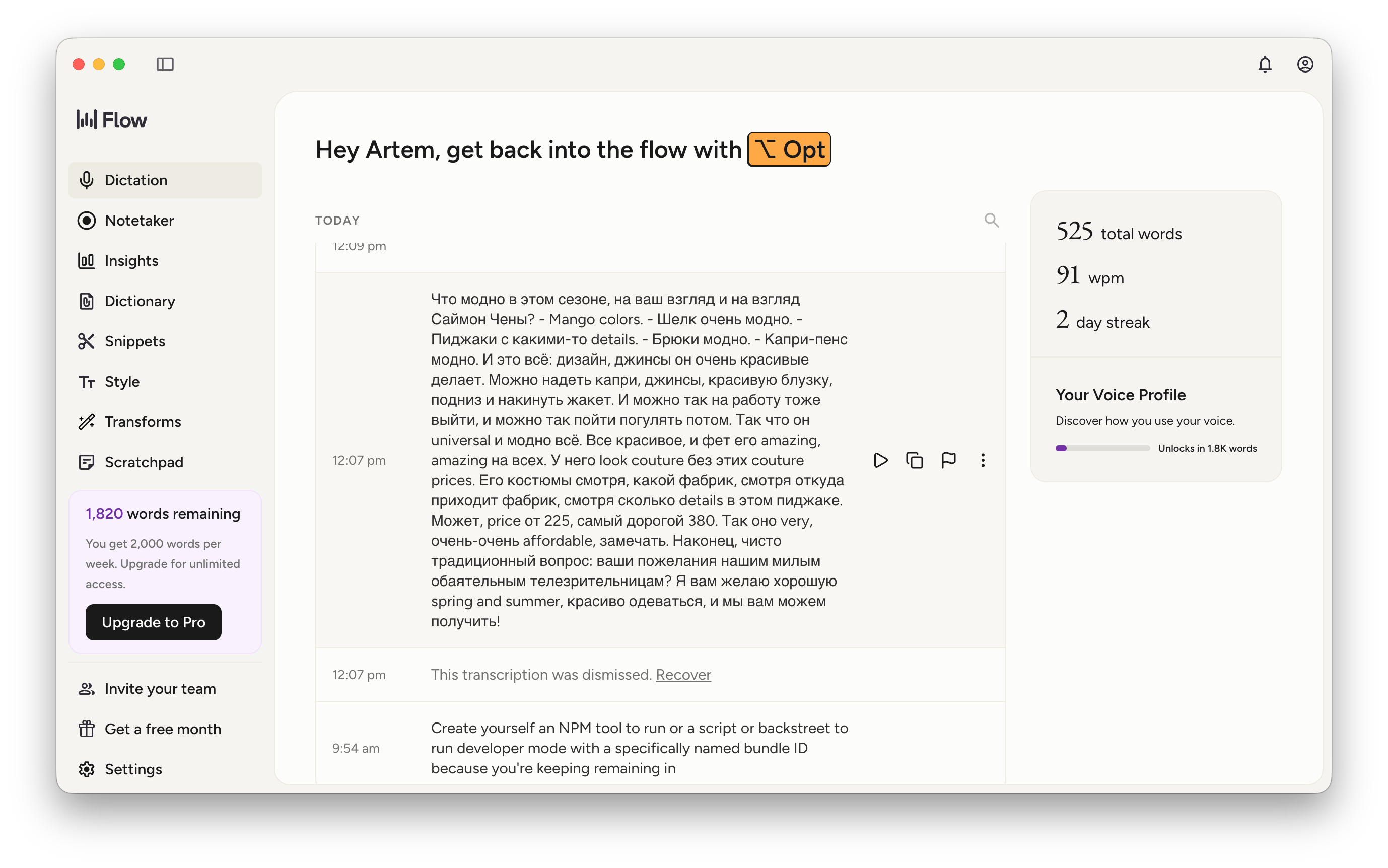
Those repairs are small on a word-count chart and irritating in real work. Our result addresses this dense Russian-English clip, not every Wispr Flow workflow. The broader Wispr Flow alternatives guide covers its other strengths.
Superwhisper: model choice changed the result
Superwhisper’s raw S1 Voice output caught some mixed phrases but returned 95 words against the 146-word reference. Its S1 Language stage produced a more consistent transcript by normalizing the speech toward Russian, the opposite of what this fidelity test required.
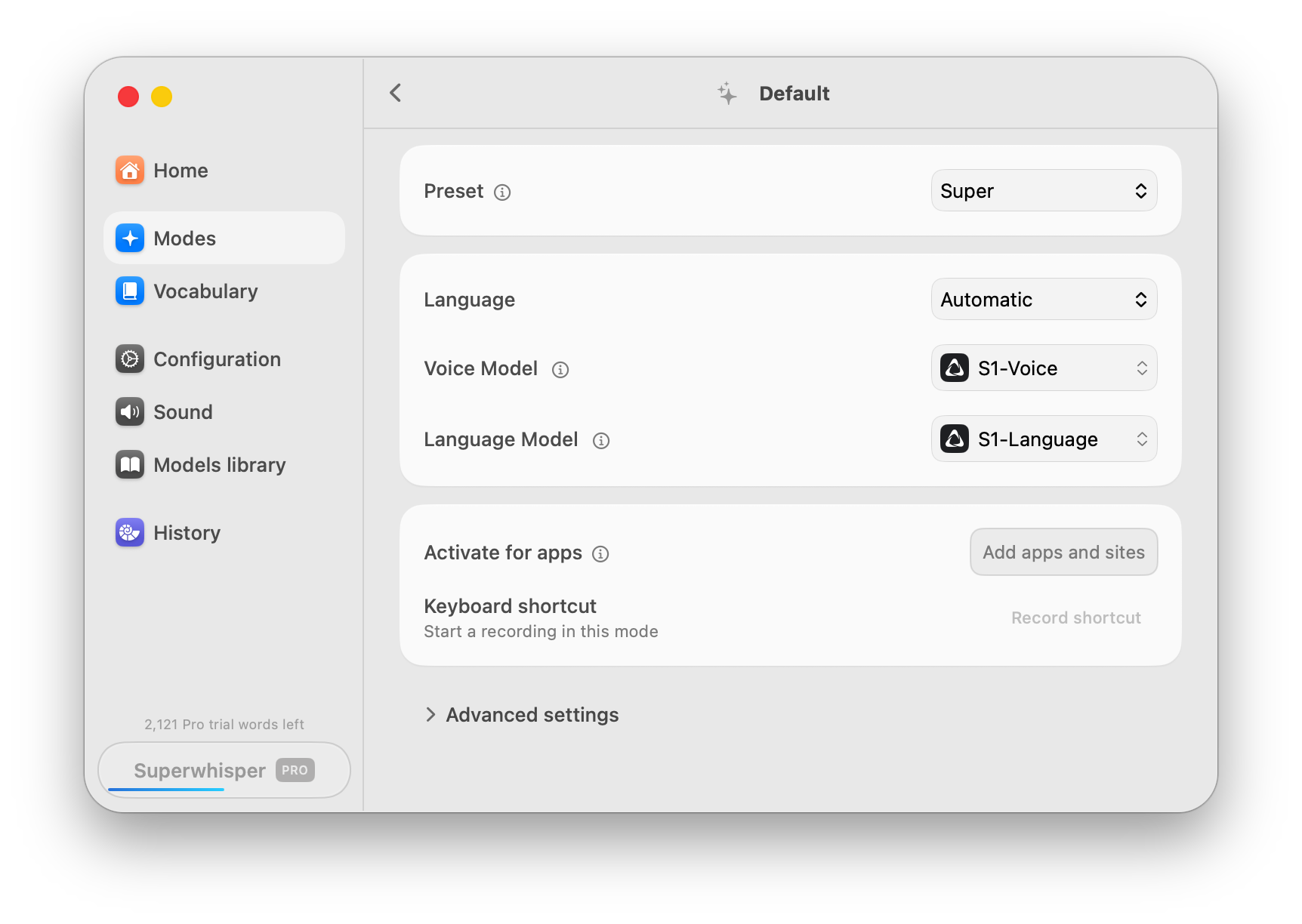
That does not make language cleanup useless. It means bilingual users should test the final pipeline, not only the raw recognition model.
Which free bilingual dictation apps should you test?
Apple Dictation, Google Docs Voice Typing, and Microsoft Dictate are three free or included baselines, not measured winners. We did not run them through the Russian-English benchmark, so they are starting points for your own test.
- Apple Dictation works anywhere you can type on a Mac. Apple’s guide says you can configure multiple dictation languages and switch between them. That makes it a good free baseline for switching between passages, though you should still test mid-sentence code-switching.
- Google Docs Voice Typing works in current Chrome, Edge, and Safari versions. Google’s documentation lists many languages and accents, but voice commands are English-only. It fits writers who live in Docs, not people who need app-wide dictation.
- Microsoft Dictate turns speech into text in Word, Outlook, PowerPoint, and other Microsoft 365 apps with a microphone and internet connection. Microsoft’s support page makes it the obvious baseline for a Word-first workflow.
Why is WER not enough for bilingual speech-to-text?
Word error rate can hide the exact mistakes bilingual speakers care about. If most of a recording is Russian, an app can score reasonably while destroying every English product name, quote, or technical term.
Minority-language recall catches that failure. Script preservation catches another: “fabric” and “фабрик” may sound similar, but they are not interchangeable when you need faithful speech, searchable notes, or a customer’s exact wording.
Completeness matters too. Missing text is harder to notice than a misspelling, especially when the omission happens during a language switch. The best voice-to-text software should preserve meaning before it polishes style.
How can you run a bilingual dictation stress test in 10 minutes?
Build one short recording around the language boundaries that occur in your real work, then replay that exact audio in every app. We use roughly 70 seconds because it is long enough to expose drift and short enough to score by hand.
- Record for about 70 seconds at your normal pace.
- Put 20 to 30 second-language words inside your primary-language grammar.
- Include a full name, a brand, a number, and a borrowed noun with an inflected ending.
- Force two switches inside sentences and finish with a phrase in the second language.
- Replay the same audio with each app’s default settings, then with the languages you actually use selected.
- Score the final inserted text, not a live preview, against a human reference.
- Count total word errors, second-language recall, script changes, omissions, and unwanted translations.
Do not count a fluent translation as accurate dictation unless you asked for translation. The useful app is the one that keeps your words, script, names, and meaning intact.
If you are still setting up your first workflow, our voice dictation starter guide covers microphones, shortcuts, and everyday practice before you run the bilingual stress test.
Frequently asked questions about bilingual dictation apps
What is the best bilingual dictation app?
AI Dictation gave the strongest Russian-English result in our test. Its final product output scored 11.6% word error rate, preserved 26 of 27 English tokens inside Russian speech, and completed the recording.
Can dictation apps transcribe two languages in one sentence?
Yes, but the result depends on the app, model, language pair, and settings. In our Russian-English test, some apps preserved both languages while others transliterated English words into Cyrillic, translated speech, or dropped part of the recording.
What is code-switching in speech recognition?
Code-switching is moving between languages while speaking, sometimes inside one sentence. Speech recognition systems must detect each switch without translating the words, changing their script, or losing the surrounding context.
What is the best free bilingual dictation app?
This benchmark did not measure a free winner. Apple Dictation, Google Docs Voice Typing, and Microsoft Dictate are the three free or included baselines to test with your own language pair.
How should I test a bilingual dictation app?
Record about 70 seconds with 20 to 30 second-language words, a full name, a brand, a number, and two mid-sentence switches. Compare WER, minority-language recall, script preservation, completeness, translation, and name accuracy.
Which bilingual dictation app should you choose?
Choose AI Dictation for dense code-switching, Wispr Flow for a polished cross-device workflow, Superwhisper for Mac model control, or a built-in tool for occasional free dictation. Your own language pair should make the final decision.
Our Russian-English benchmark is a hard test, not a universal promise. Still, the measured gap was large: 96.3% English-token recall for AI Dictation versus 44.4% for the weakest scored app output.
If mixed-language speech is part of your day, download AI Dictation, select the languages you use, and run your own 70-second test.
Frequently Asked Questions
What is the best bilingual dictation app?
AI Dictation gave the strongest Russian-English result in our test. Its final product output scored 11.6% word error rate, preserved 26 of 27 English tokens inside Russian speech, and completed the recording.
Can dictation apps transcribe two languages in one sentence?
Yes, but the result depends on the app, model, language pair, and settings. In our Russian-English test, some apps preserved both languages while others transliterated English words into Cyrillic, translated speech, or dropped part of the recording.
What is code-switching in speech recognition?
Code-switching is moving between languages while speaking, sometimes inside one sentence. Speech recognition systems must detect each switch without translating the words, changing their script, or losing the surrounding context.
What is the best free bilingual dictation app?
This benchmark did not measure a free winner. Apple Dictation, Google Docs Voice Typing, and Microsoft Dictate are the three free or included baselines to test with your own language pair.
How should I test a bilingual dictation app?
Record about 70 seconds with 20 to 30 second-language words, a full name, a brand, a number, and two mid-sentence switches. Compare WER, minority-language recall, script preservation, completeness, translation, and name accuracy.
Ready to try AI Dictation?
Experience fast voice-to-text on your device. Free to download.
Download FreeRelated Posts
Audio & Video Transcription Powered by AI: A Practical Guide
Learn how audio & video transcription powered by AI works, what affects accuracy, and how to pick the right workflow for interviews, lectures, and meetings.
AI Dictation vs Diktuy: Russian-English Accuracy Test
We tested AI Dictation vs Diktuy on the same Russian-English recording. Compare WER, English-word preservation, full transcripts, and errors.
AI Dictation vs Oravo: Bilingual Accuracy Test
We tested AI Dictation vs Oravo on the same Russian-English clip. Compare WER, English-word preservation, AI enhancement, and transcript fidelity.